Any company domain in, its real logo out
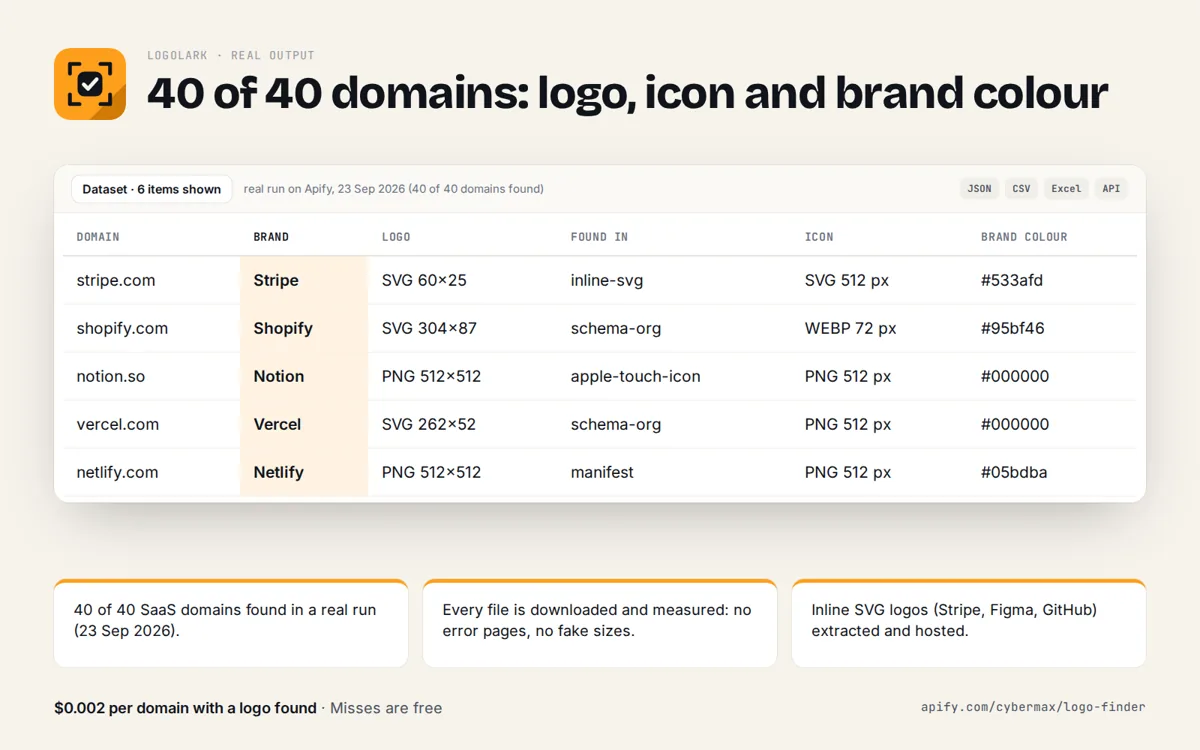
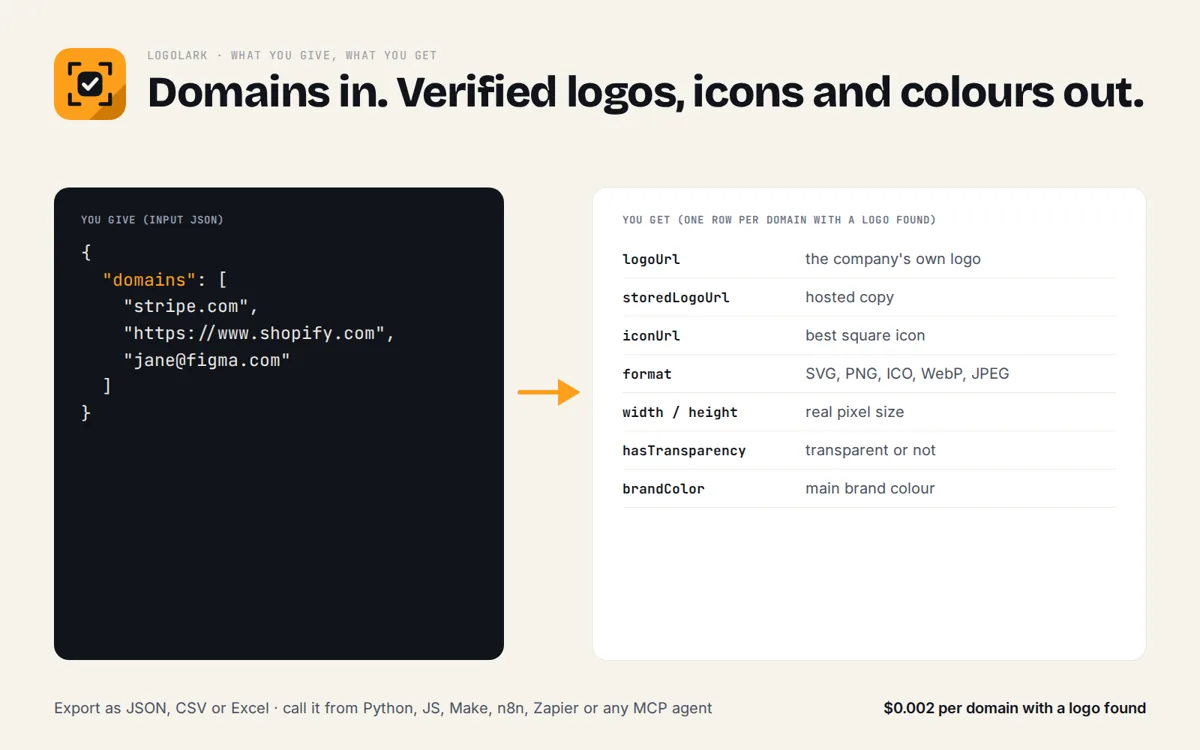
Give a domain, URL or work email. Logolark reads the company's own website, downloads every logo and icon it publishes, checks the real format and size, and returns the best logo, the best square icon and the brand colour.
Who it's for
Anyone who needs this answer fast, from a person to an AI agent.
Show a real logo next to every account and lead.
Fill company cards with a verified logo, icon and brand colour.
Answer "what does this company's logo look like?" with a checked image URL.
Grab the SVG or the largest PNG a site publishes, plus its brand colour.
Try it
Enter up to 5 domains, URLs or work emails.
Raw JSON response
Real sample output
Captured from a live call to this API (trimmed for length).
{
  "results": [
    {
      "input": "stripe.com",
      "domain": "stripe.com",
      "ok": true,
      "finalUrl": "https://stripe.com/",
      "httpStatus": 200,
      "logoIsIcon": true,
      "brandName": "Stripe",
      "themeColor": null,
      "logoUrl": "https://images.stripeassets.com/fzn2n1nzq965/1hgcBNd12BfT9VLgbId7By/01d91920114b124fb4cf6d448f9f06eb/favicon.svg",
      "iconUrl": "https://images.stripeassets.com/fzn2n1nzq965/1hgcBNd12BfT9VLgbId7By/01d91920114b124fb4cf6d448f9f06eb/favicon.svg",
      "logo": {
        "url": "https://images.stripeassets.com/fzn2n1nzq965/1hgcBNd12BfT9VLgbId7By/01d91920114b124fb4cf6d448f9f06eb/favicon.svg",
        "source": "link-icon",
        "format": "svg",
        "width": 512,
        "height": 512,
        "bytes": 412,
        "vector": true,
        "square": true,
        "hasTransparency": true,
        "dominantColor": "#533afd",
        "colors": [
          "#533afd"
        ]
      },
      "icon": {
        "url": "https://images.stripeassets.com/fzn2n1nzq965/1hgcBNd12BfT9VLgbId7By/01d91920114b124fb4cf6d448f9f06eb/favicon.svg",
        "source": "link-icon",
        "format": "svg",
        "width": 512,
        "height": 512,
        "bytes": 412,
        "vector": true,
        "square": true,
        "hasTransparency": true,
        "dominantColor": "#533afd",
        "colors": [
          "#533afd"
        ]
      },
      "brandColor": "#533afd",
      "ms": 113,
      "checkedAt": "2026-09-25T23:03:24.159Z"
    },
    {
      "input": "github.com",
      "domain": "github.com",
      "ok": true,
      "finalUrl": "https://github.com/",
      "httpStatus": 200,
      "logoIsIcon": true,
      "brandName": "GitHub",
      "themeColor": "#1e2327",
      "logoUrl": "https://github.githubassets.com/assets/app-icon-512-7f9c4ff2e960.png",
      "iconUrl": "https://github.githubassets.com/assets/app-icon-512-7f9c4ff2e960.png",
      "logo": {
        "url": "https://github.githubassets.com/assets/app-icon-512-7f9c4ff2e960.png",
        "source": "manifest",
        "format": "png",
        "width": 512,
        "height": 512,
        "bytes": 9825,
        "vector": false,
        "square": true,
        "hasTransparency": false,
        "dominantColor": "#08090a",
        "colors": [
          "#08090a",
          "#141719",
          "#191d21",
          "#0d0f11"
        ]
      },
      "icon": {
        "url": "https://github.githubassets.com/assets/app-icon-512-7f9c4ff2e960.png",
        "source": "manifest",
        "format": "png",
        "width": 512,
        "height": 512,
        "bytes": 9825,
        "vector": false,
        "square": true,
        "hasTransparency": false,
        "dominantColor": "#08090a",
        "colors": [
          "#08090a",
          "#141719",
          "#191d21",
          "#0d0f11"
        ]
      },
      "brandColor": "#08090a",
      "ms": 100,
      "checkedAt": "2026-09-25T23:03:24.146Z"
    },
    {
      "input": "mozilla.org",
      "domain": "mozilla.org",
      "ok": true,
      "finalUrl": "https://www.mozilla.org/en-US/",
      "httpStatus": 200,
      "logoIsIcon": false,
      "brandName": "Mozilla",
      "themeColor": null,
      "logoUrl": "https://www.mozilla.org/media/protocol/img/logos/firefox/browser/logo.eb1324e44442.svg",
      "iconUrl": "https://www.mozilla.org/media/img/favicons/mozilla/apple-touch-icon.05aa000f6748.png",
      "logo": {
        "url": "https://www.mozilla.org/media/protocol/img/logos/firefox/browser/logo.eb1324e44442.svg",
        "source": "header-img",
        "format": "svg",
        "width": 512,
        "height": 512,
        "bytes": 10572,
        "vector": true,
        "square": true,
        "hasTransparency": true,
        "dominantColor": "#fff44f",
        "colors": [
          "#fff44f",
          "#ff980e",
          "#ff3647",
          "#e31587"
        ]
      },
      "icon": {
        "url": "https://www.mozilla.org/media/img/favicons/mozilla/apple-touch-icon.05aa000f6748.png",
        "source": "apple-touch-icon",
        "format": "png",
        "width": 180,
        "height": 180,
        "bytes": 467,
        "vector": false,
        "square": true,
        "hasTransparency": false,
        "dominantColor": "#231f20",
        "colors": [
          "#231f20",
          "#00d230"
        ]
      },
      "brandColor": "#fff44f",
      "ms": 558,
      "checkedAt": "2026-09-25T23:03:24.604Z"
    }
  ],
  "count": 3
}
Limits, plainly
Free and rate limited so it stays fast for everyone. A bulk and scheduled version for big lists is coming to the Apify Store.
- 15 calls per minute per IP address.
- Up to 5 domains per call.
- Up to 10 logo and icon candidates are downloaded and checked per domain (6 when you send 5 domains).
- About 15 seconds per call at most.
- Free, no key. Logos stay the property of their owners.
Use the API
JSON over HTTPS, CORS enabled, no key. GET for quick calls, POST a JSON body for lists. Spec: openapi.json · llms.txt
curl -s "https://logolark.cybermax-tools.workers.dev/api/logo?domain=stripe.com%2C+github.com%2C+mozilla.org"

# lists: POST a JSON body
curl -s -X POST https://logolark.cybermax-tools.workers.dev/api/logo \
  -H "content-type: application/json" \
-d '{"domains":["stripe.com","jane@figma.com"]}'import requests
r = requests.post("https://logolark.cybermax-tools.workers.dev/api/logo",
json={"domains":["stripe.com","jane@figma.com"]}, timeout=30)
r.raise_for_status()
for row in r.json()["results"]:
print(row)Endpoints: /api/logo find the verified logo, icon and brand colour of up to 5 companies
Add it to your AI agent (MCP)
A remote MCP server at https://logolark.cybermax-tools.workers.dev/mcp (streamable HTTP, no auth). Read-only tools with JSON schemas, so agents know exactly what to send.
// Claude Desktop, Cursor, VS Code, any MCP client (remote, no key)
{
  "mcpServers": {
    "logolark": { "type": "http", "url": "https://logolark.cybermax-tools.workers.dev/mcp" }
  }
}

# Claude Code
claude mcp add --transport http logolark https://logolark.cybermax-tools.workers.dev/mcp

# Tools: find_logo
# e.g. find_logo({"domains":["stripe.com"]})
find_logo
Find a company's real logo and square icon from its own website, verified by downloading: logo URL, icon URL, format (SVG/PNG/ICO/WebP), pixel size, transparency, brand name and brand colour (hex). Use when you need a company's logo image or brand colour. Accepts domains, URLs or work emails; up to 5 per call.
FAQ
Why not a logo CDN or a favicon service?
Those return a cached guess, often a 16 px favicon or a blank placeholder. Logolark reads the company's own site now, downloads each candidate and checks its real format and size, so you get the actual logo or a clear "not found".
Where does the logo come from?
From the company's website only: schema.org Organization logo, og:logo, the header logo image or SVG, link icons, apple-touch-icon, the web manifest and /favicon.ico. Partner and customer logo walls are ignored.
Can I pass an email address?
Yes. jane@figma.com is looked up as figma.com.
What does it cost?
Nothing. The API and MCP server are free and rate limited. A bulk version with hosted copies and rebrand alerts is coming to the Apify Store.
Can I use the logos?
Logos are trademarks of their owners. Use them to identify the company (for example next to its name in a CRM) and follow each brand's guidelines.